

Crypto.com Review 2026: Pros, Cons, Features & Rewards
We may earn commissions from affiliate links or include sponsored content, clearly labeled as such. These partnerships do not influence our editorial independence or the accuracy of our reporting. By continuing to use the site you agree to our terms and conditions and privacy policy.

If you had asked us to describe Crypto.com in years past, we would have called it a sleek mobile wallet with a metal debit card. A comprehensive Crypto.com review in 2026 invites much more depth.
Crypto.com has added several new features that blur the lines between a cryptocurrency exchange, a stockbroker, and a high-yield savings account. It’s not just a crypto app with a card anymore. The revamped platform targets users who want to do more than trade crypto and collect card rewards.
However, adding features often adds more complexity, which may feel overwhelming to new or returning users. In our Crypto.com review, we’ll explore the platform’s updates and study the new fee structures.
We’ll also examine the platform’s “Level Up” rewards program to determine who benefits from it and whether the crypto rewards are worth the commitment. Let’s begin with a brief overview before we delve into Crypto.com’s offerings in more detail.
Key Takeaways from Our Crypto.com Review
Crypto.com compares favorably with competing platforms, offering low trading fees on more than 400 tradable cryptocurrencies. The platform also boasts an impressive list of licenses, placing it ahead of many similar exchanges in terms of regulatory compliance.
| Overall Rating | 9/10 |
| Best For | Ecosystem (CRO) stakers & “Level Up” subscribers |
| Supported Assets | 400+ Cryptocurrencies, Global Stocks, ETFs |
| Trading Fees |
|
| Payment Methods | Bank Transfer (ACH/SEPA), Credit or Debit Card, PayPal, Apple Pay |
| Minimum Trade | ~$1 USD (Varies by asset) |
| Mobile App Rating | 4.4/5 Android, 4.7/5 iOS |
| CRO Token Benefits | Cash Earn boosters, Card rewards, Trading fee discounts |
| Security Score | AAA CER.live rating (ISO/IEC 27001:2013, SOC2 Type 2, NIST Framework) |
| Proof of Reserves (crypto assets) | Merkle Tree Verification (Self-Verified) |
| Staking APR | Up to 9.5% (CRO Lockup via Level Up) |
| Availability | 90+ Countries (Stock trading available in the U.S., UK, EEA) |
| Regulation | U.S. (CFTC/FinCEN), UK (FCA), Singapore (MAS), Dubai (VARA) |
What is Crypto.com?
Founded in 2016, Crypto.com has evolved from a crypto platform centered on debit cards into a well-rounded financial app. The new ecosystem enables users to diversify their investments across both cryptocurrencies and traditional stocks. This dual strategy aligns with the Singapore-based company’s original mission to put cryptocurrency in every wallet.
Crypto.com now serves over 100 million users globally. However, its 2026 strategy is clearly broader: Crypto.com aims to replace your bank and your stockbroker, not just your crypto wallet.
Today, the platform operates as a dual-platform ecosystem, and understanding the difference between its two core products is essential for new users:
- The Crypto.com App: Available on mobile and now via a web interface, the app is a simplified interface designed for beginners and “Level Up” subscribers. It functions as a broker, allowing you to buy crypto, trade global stocks (in supported regions), and manage your Visa card with a single click. Prices here include a “spread” (markup) for convenience. However, spread fees are higher than trading fees on the Exchange, which we’ll discuss next.
- The Crypto.com Exchange: This is a separate, professional-grade web platform designed for active traders. The exchange features advanced charting, customizable limit orders, and notably lower trading costs.
For most users, Crypto.com acts as the bridge between traditional finance and digital assets. You can buy Bitcoin, invest in Apple stock, and earn yield on stablecoins all on the same platform. It’s convenient for investors who want to diversify, and that’s the primary pitch, but Crypto.com also offers a wider selection of cryptocurrencies (over 400) than the limited assortment of crypto ETFs available from traditional brokerages.
Supported Markets and Assets
One of Crypto.com’s key strengths is its wide range of supported assets. Crypto.com is often one of the first major centralized exchanges to list Layer-2 tokens and newer meme coins. For example, when the TRUMP token launched, Crypto.com was among the first exchanges to make the token available to anxious traders. Notably, some features and markets are only supported on the Exchange web app, which uses the same account login as the Crypto.com app (mobile).
- Cryptocurrencies: The platform supports over 400+ cryptocurrencies. You’ll find the deepest liquidity in market leaders like Bitcoin (BTC) and Ethereum (ETH) while also gaining access to promising altcoins and meme coins.
- Fiat Markets: Users can fund their accounts with 20+ fiat currencies, including USD, EUR, GBP, AUD, and CAD. On the App, you can buy/sell crypto directly against any supported currencies. Crypto.com does the conversion in the background. However, on the Exchange, direct trading pairs are primarily limited to USD and EUR.
- Stocks & ETFs: Users can trade hundreds of global stocks and ETFs commission-free. Crypto.com allows users to transfer settled funds between their stock and crypto balances, enabling them to trade either asset type.
- Derivatives: The Crypto.com Exchange also offers derivatives markets, including perpetuals (up to 100x) and dated futures. Availability varies by region. Additionally, Crypto.com offers simple binary options, regulated by the CFTC.
- Margin Trading: The Exchange platform offers margin trading with up to 10x leverage.
- NFTs: Crypto.com’s integrated NFT marketplace aggregates collections from the Cronos, Ethereum, Polygon, and Solana blockchains. Notably, users can buy NFTs with a credit/debit card. Again, Crypto.com handles the conversion in the background, purchasing crypto to fund the blockchain transaction and cover gas fees.
- Staking Markets: The platform also offers on-chain staking for proof-of-stake (PoS) assets, including ETH, SOL, and DOT. Yields typically range from 3-4%.
- Indicators & Trading Tools: The Exchange interface is fully integrated with TradingView, a well-known platform renowned for its extensive library of technical indicators and trading tools.
Crypto.com Features & Tools
If you’re accustomed to simpler platforms, Crypto.com can seem a bit challenging to navigate, with part of that due to the way they split features (App versus Exchange). However, that delineation helps to make the platform both easy to use and powerful, depending on which tools you put to work. To help you navigate, let’s explore the core utilities that drive the platform’s value.
Crypto.com Exchange
The mobile app is typically the first experience users have with the platform and provides a simplified interface with basic buy and sell buttons and little discussion about the mechanics under the hood. By contrast, the Crypto.com Exchange is a well-equipped trading platform that caters to active traders.
The Exchange is accessible through its own web interface and offers advanced features like spot margin, dated futures, perpetual futures, and customizable trading bots. Expect deep liquidity on leading crypto assets and full integration with TradingView’s charts.
The most compelling reason to use the Exchange, however, is cost. When you trade on the mobile app, you pay a spread, which is a markup on the price that allows the exchange to guarantee a price quote. By moving your funds to the Exchange interface, you can place limit orders with transparent maker/taker fees, which can be as low as 0% for users who stake the CRO token.
Crypto.com Visa Card
The metal Visa card is the product that originally put Crypto.com on the map, becoming a status symbol in the crypto community. Thanks to the new Level Up program, this popular debit card (funded by cash or crypto) remains a market leader.
The biggest change in the new card versus the card of yesteryear is flexibility: users are no longer forced to stake thousands of dollars in volatile cryptocurrency to unlock premium benefits. You can now access higher card tiers, including the coveted metal cards, through a monthly subscription, similar to Coinbase One. Subscribers also save on trading fees.
However, the top tiers still require users to lock up CRO tokens, whereas lower tiers offer lock or subscription options.
- Plus (Ruby): You can pay $4.99/month OR lock up $500 of CRO.
- Pro (Jade/Indigo): You can pay $29.99/month OR lock up $5,000 of CRO.
- Private (Icy/Rose): This remains Lockup Only ($50,000+). There is no monthly subscription option for this top tier.
These tiers align with Crypto.com’s Level Up program, which provides additional benefits at each level.
Despite the departure from the familiar tier qualifications used in the past, the card perks remain attractive. Most subscribed cardholders can earn up to 5% cashback in CRO (Crypto.com’s Cronos token) on every purchase. Higher tiers (Plus, Pro, Private) earn increasingly higher percentages in cashback, and the exclusive Prime tier can earn 6% cashback.
Premium cardholders enjoy additional benefits, including merchant rebates for subscriptions such as Spotify and Netflix. For frequent travelers, the upper tiers still include unlimited Priority Pass airport lounge access, making it one of the few debit cards that directly compete with premium travel credit cards.
Of note, Crypto.com now offers a credit card for U.S. residents as well. The Crypto.com Visa Signature Credit Card also offers rewards, with subscriber tiers determining the rewards earned.
Crypto Earn
For users who plan to hold assets long-term, Crypto Earn allows you to generate yield on over 20 crypto assets, including Bitcoin, Ethereum, and stablecoins.
You can deposit your crypto for a 1-month, 3-month, or 12-month term, or opt for flexible withdrawal. Crypto.com uses these funds in a lending pool, paying you interest collected from borrowers. Longer lockups yield higher returns, although rates vary depending on the asset and its specific quota. Effectively, as pools fill or caps are reached, rates fall. We observed rates ranging from under 1% (Bitcoin Flexible) to 16% (the promotional APR for the LION token).
Yields can also get a boost based on your Level Up tier. While standard users earn baseline rates, Private members (those with higher CRO lockups) receive an additional 1-2% per year, paid in CRO, on fixed-term lending commitments.
Crypto.com also offers a Cash Earn product, which earns 1.5% to 5% in CRO tokens. This product does not derive its yields from lending, but we mention it here to differentiate it from the similarly named Crypto Earn product. At its highest tiers, Cash Earn competes with high-yield savings and money market accounts.
Crypto Staking
Unlike the Earn program, which lends your assets out to generate yield, Crypto.com’s staking options allow you to participate in securing blockchain networks. This is particularly true for on-chain staking, where the CRO token is the star of the show.
Cronos (CRO) is the native token of the Cronos blockchain and the core of the Crypto.com ecosystem. Staking CRO offers an additional way to unlock higher tiers in the Level Up program. As you Level Up by reaching key thresholds, you boost your rewards across the entire app (including card cashback and Earn yields).
CRO staking lockup amounts range from $500 (Plus tier) to $500,000 (Private tier), with yields tied to the staked amount.
CRO Staking Rewards
- Plus ($500 lockup): 0% yield on staked CRO. Staking unlocks up to 3.5% card rewards and avoids the monthly subscription fee.
- Pro ($5,000 lockup): 4% yield on staked CRO.
- Private ($50,000+ lockup): 8.5% to 9.5% yield on staked CRO.
Crypto.com also offers on-chain staking for over a dozen Proof-of-Stake (PoS) blockchains. Users can stake popular assets like Ethereum (ETH), Solana (SOL), Polkadot (DOT), and Cardano (ADA) with a few clicks.
Crypto.com automates the process for staking these assets. However, on-chain staking often comes with unbonding periods during which your funds earn no staking rewards and cannot be withdrawn. For example, SOL unstaking typically requires 5 days, whereas ETH can take a few days to a few weeks, depending on network demand.
On-chain staking yields also vary based on network demand.
- CRO: 4% to 9.5% (Pro and Private tiers).
- Altcoins: Generally range from 1% to 12%. For example, we saw Ethereum rates at 3% and Polkadot rates at 10%.
Similar to derivatives on the platform, staking availability varies by region, with some countries and individual U.S. states ineligible for staking through the platform.
Crypto.com Pay
Crypto.com’s Pay feature allows you to pay merchants and friends directly with crypto, bypassing traditional card networks.
You can spend your crypto at thousands of online merchants via the Pay with Crypto.com button. You can also purchase gift cards for major retailers, such as Apple or Starbucks, using your crypto balance on the platform. Crypto.com swaps your crypto for the required fiat currency.
The Pay feature also earns Cashback Rewards. Using the Pay feature for gift cards or partner merchants earns Pay Rewards, typically 1.5% to 5%. Rewards for peer-to-peer payments (sending crypto to friends) are capped at $5 USD per month.
Crypto.com NFT Marketplace
Crypto.com integrates an NFT Marketplace directly with the main app. This alone isn’t a standout feature. However, the platform provides the option to buy with crypto or a debit card, the latter of which is less common.
Collections include major cross-platform collections (like Bored Ape Yacht Club) as well as Crypto.com exclusives (like the Loaded Lions). You can buy or sell NFTs on popular chains, including Ethereum, Cronos, Polygon, Solana, and Cronos POS (a separate Cronos chain).
Crypto-Backed Loans
This feature allows you to access the value of your assets without having to sell them. You’re borrowing, using your crypto as collateral.
Loan-to-Value (LTV) ratios typically cap at 50%. For example, you deposit $10,000 in BTC to borrow $5,000 USDC. Interest Rates vary and depend heavily on your CRO lockup. They generally range from 8% APR (for high-tier Private members), with standard users paying up to 12%+ to borrow against their crypto.
Supercharger Liquidity Mining
Supercharger is a liquidity mining platform designed for simplicity. Think of it as a marketing tool for new project tokens. However, availability varies by region. It’s not available in the U.S., for example.
Here’s how it works. You deposit CRO into a liquidity pool, and you can withdraw at any time. In exchange for your liquidity, you earn yield in other tokens, which might include BTC, ETH, or new project tokens.
Crypto.com calculates the percentage yield you earn based on your “Reward Score” (your share of the total pool over time). Therefore, it’s proportional to your share of the pool, based on your average daily balance. Yields can be quite high (20%+) during promotions, but typically align with fixed-term yields from the Earn program.
Crypto.com DeFi Wallet
Similar to other exchanges, Crypto.com now also offers a standalone No-KYC wallet app that gives you full ownership of your assets, separate from the custodial exchange.
Unlike the main app, you control your private keys (via a 12-word recovery phrase). If you lose this phrase, Crypto.com can’t help you recover your crypto. However, this non-custodial wallet supports WalletConnect, making it easy to access decentralized applications (dApps). The DeFi Wallet features an in-app browser and highlights popular blockchain destinations across more than 30 blockchains.
CRO Token
While you can use the Crypto.com app without ever owning CRO, holding and locking up the token is the only way to unlock the platform’s full potential.
On-chain, CRO is used to pay for transaction fees (“gas”) on the Cronos network. However, within the Crypto.com App and Exchange, it functions as a loyalty token. Although you can use the Crypto.com App without ever owning CRO, the more CRO you hold or lock up, the more benefits you receive across the Crypto.com ecosystem.
For example, as we detailed in the Staking section, your CRO lockup determines your tier in the Level Up program (Plus, Pro, Private). This status acts as a multiplier for nearly every other feature on the platform.
- Visa Card Tiers: Higher CRO lockups unlock the premium metal Visa cards and increase your cashback rates on spending (up to 5-6% for top tiers).
- Earn Boosters: Private members (highest CRO lockups) earn an additional 2% yield (paid in CRO) on their fixed-term lending deposits.
- Trading Discounts: For active traders using the Crypto.com Exchange (the separate web-based platform), staking CRO provides significant cost savings.
- Fee Rebates: Staking CRO lowers your maker/taker trading fees, with discounts scaling up based on the size of your stake.
- Pay with CRO: You can also choose to pay your trading fees directly in CRO to receive an instant discount.
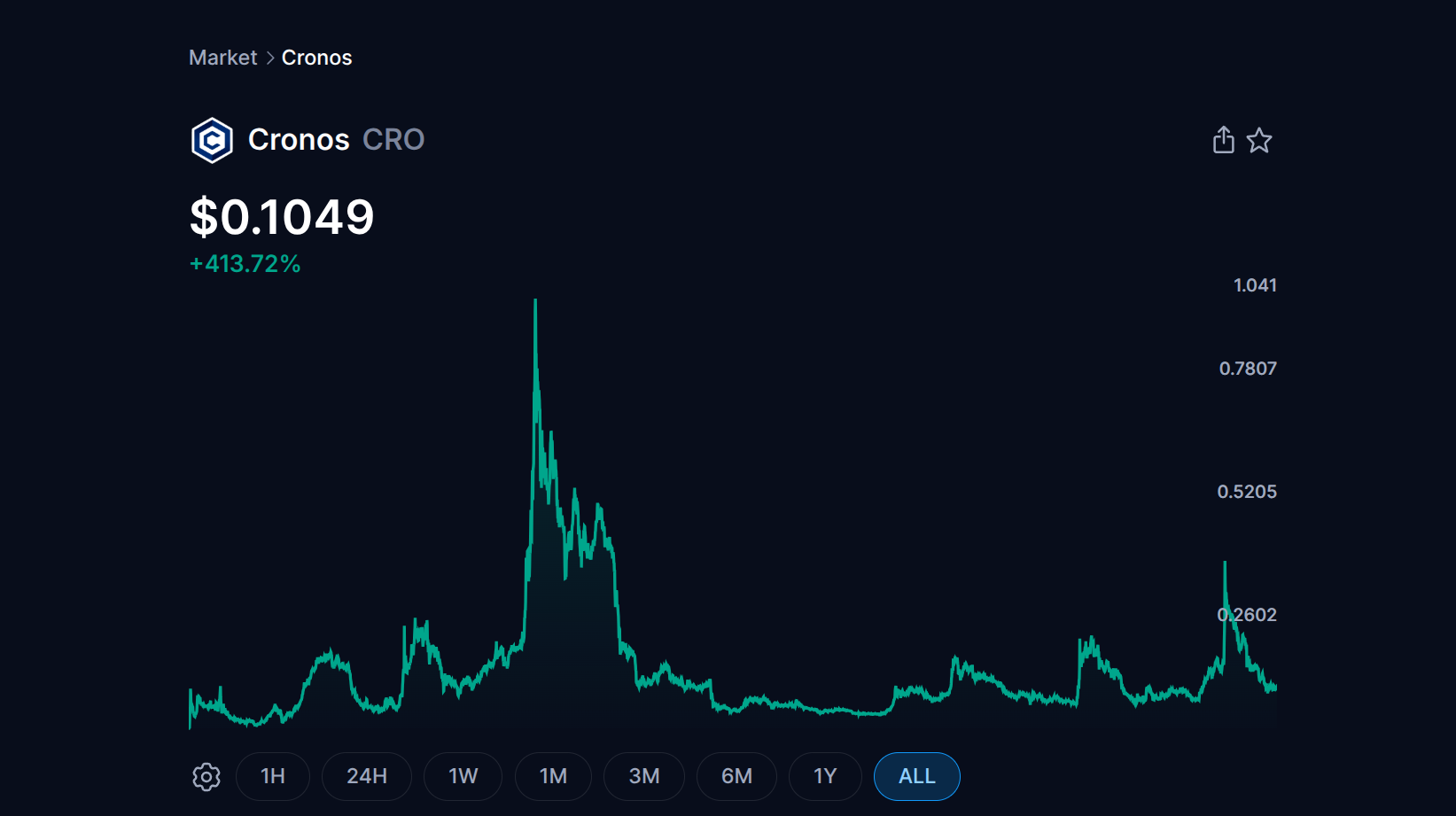
Weigh the benefits against the price risk before locking tokens. CRO has performed well for many early adopters, with gains of over 400%. However, the token’s price remains volatile. Trading in 2025 saw gains as high as 5x, but with an overall 40% slide from January to December.
Is Crypto.com Safe & Legit?
In an industry known for FTX-style collapses and questionable offshore exchanges, Crypto.com positions itself as a compliance-focused platform. Let’s explore the security and licensing status.
Licensing & Compliance
Crypto.com aggressively pursues licenses rather than dodging them or operating in gray areas. The platform holds regulatory approvals from the UK’s Financial Conduct Authority (FCA), Singapore’s Monetary Authority of Singapore (MAS), the U.S., and Canada.
Notably, Crypto.com secured FCM, DCM, and DCO CFTC derivatives licenses in 2025. This allows the exchange to offer regulated futures and options products in the U.S. It also provides advanced U.S. traders with a regulated platform for low-fee trading, rather than relying on unlicensed platforms for derivatives.
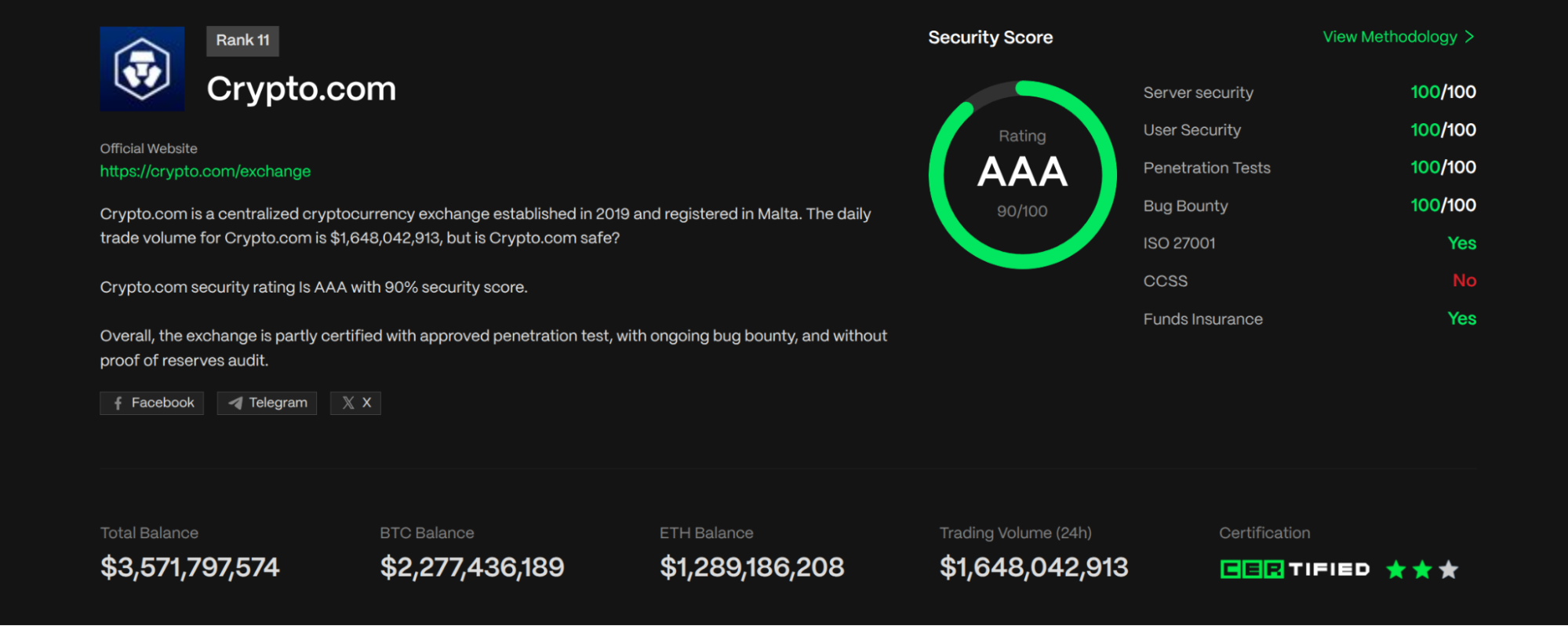
Overall, the platform holds one of the most comprehensive regulatory portfolios in the industry. This includes regulatory oversight in Australia, the U.S., the UK, France, Italy, Dubai, and an impressive list of other jurisdictions. In an independent Crypto.com security review, the platform earns a AAA rating from CER.live, a well-known security and ranking platform.
Security Infrastructure
Crypto.com holds 100% of user cryptocurrencies offline in cold storage through partners like Ledger. That 100% might seem impossibly high, but daily operations like withdrawals are handled using a separate hot wallet funded by corporate assets.
Crypto.com also carries a total of $750M in insurance against physical theft or damage. The worldwide Account Protection Program (APP) offers additional protection. At the user level, mandatory Multi-Factor Authentication (MFA) and biometric logins are standard. If an unauthorized party withdraws funds from your account despite you having MFA enabled, Crypto.com restores funds up to $250,000.
Following the 2022 FTX collapse, Crypto.com also launched a Proof of Reserves (PoR) page, which allows users to verify that their assets are held in a 1:1 ratio on the platform.
Track Record & Controversies
While the platform’s history isn’t spotless, Crypto.com responded well to prior security incidents. The platform was hacked in 2022 via a 2FA bypass, resulting in nearly $35 million in unauthorized withdrawals.
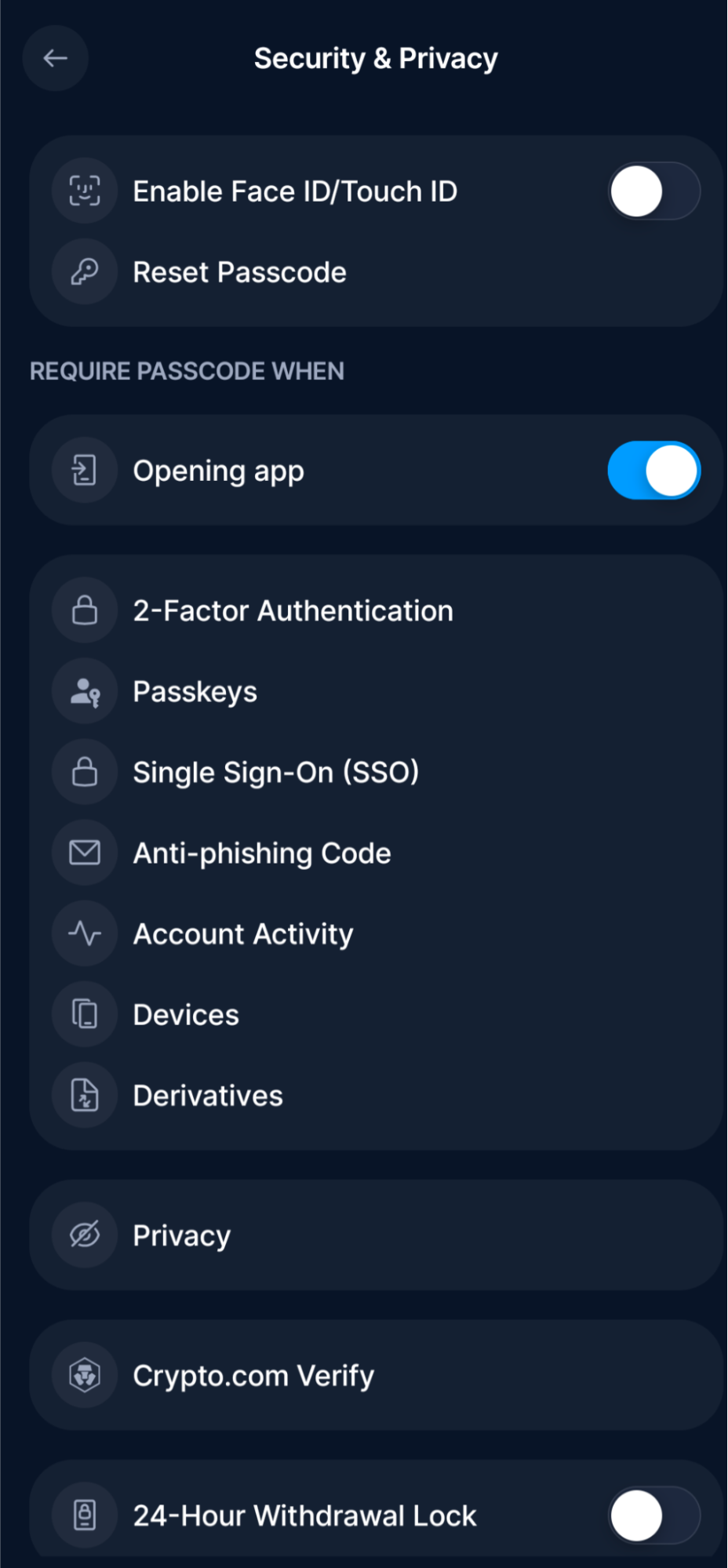
Crypto.com fully reimbursed all affected users. Following the hack, the exchange implemented a 24-hour delay for new withdrawal wallet addresses. This delay slows down the withdrawal process for non-whitelisted addresses but also provides time to respond before the crypto disappears into the wild. You can enable this in Settings > Security in the App.
Crypto.com Fees
Next in our Crypto.com review, we need to look at fees in more detail. Crypto.com’s fee structure is a tale of two platforms: The Crypto.com App pays for its convenience with higher costs (buys and sells use a spread), while the Exchange offers a more competitive fee structure. As with other areas of the ecosystem, staking CRO lowers trading fees.
| App Trading (Buy/Sell) | Spread (0.5% to 2%+) | App trades use a spread (markup) as a buffer to lock in a price quote. |
| Exchange Trading | 0.25% (Maker) / 0.50% (Taker) | Standard rates. Maker fees drop to 0% (or a rebate) if you stake 50,000 CRO or more. Volume discounts available. |
| Stock/ETF Trading | $0 Commission | U.S. users trade stocks commission-free. |
| Card Top-Up (Debit/Bank) | Free (Bank), typically 1.49% (Debit) | ACH transfers are free. Debit card top-ups in the US incur a 1.49% fee. |
| Card Top-Up (Credit Card) | 2.99% | Direct credit top-ups are often blocked. The workaround (buying crypto with a credit card to fund the card) costs 2.99% + spread. |
| Crypto Withdrawal | Flat Fee | Variable by asset; this fixed fee covers the network transaction cost. |
| Staking Service Fee | 15% – 35% of Rewards (varies by asset) | Crypto.com deducts the fee from your staking rewards. |
| Margin/Loan Interest | 0.008% – 0.052% daily | Exchange Margin: Standard rate is 0.052% per day. |
| P2P Transfers | Free | Sending crypto to other App users is free. |
| Inactivity Fee | ~$5 / month | Charged after 12 months of inactivity (varies by currency: $5, €5, £5). |
Crypto.com App User Experience
The Crypto.com app is designed to be a single hub that enables trading, sending/spending, and earning. However, this all-in-one ambition can make the interface feel crowded for total beginners, while also seeming somewhat limited for advanced traders. There’s a proper tool for every job. For beginners, it’s the Crypto.com app, which we’ll focus on for this part of our Crypto.com review.
Visuals & Navigation
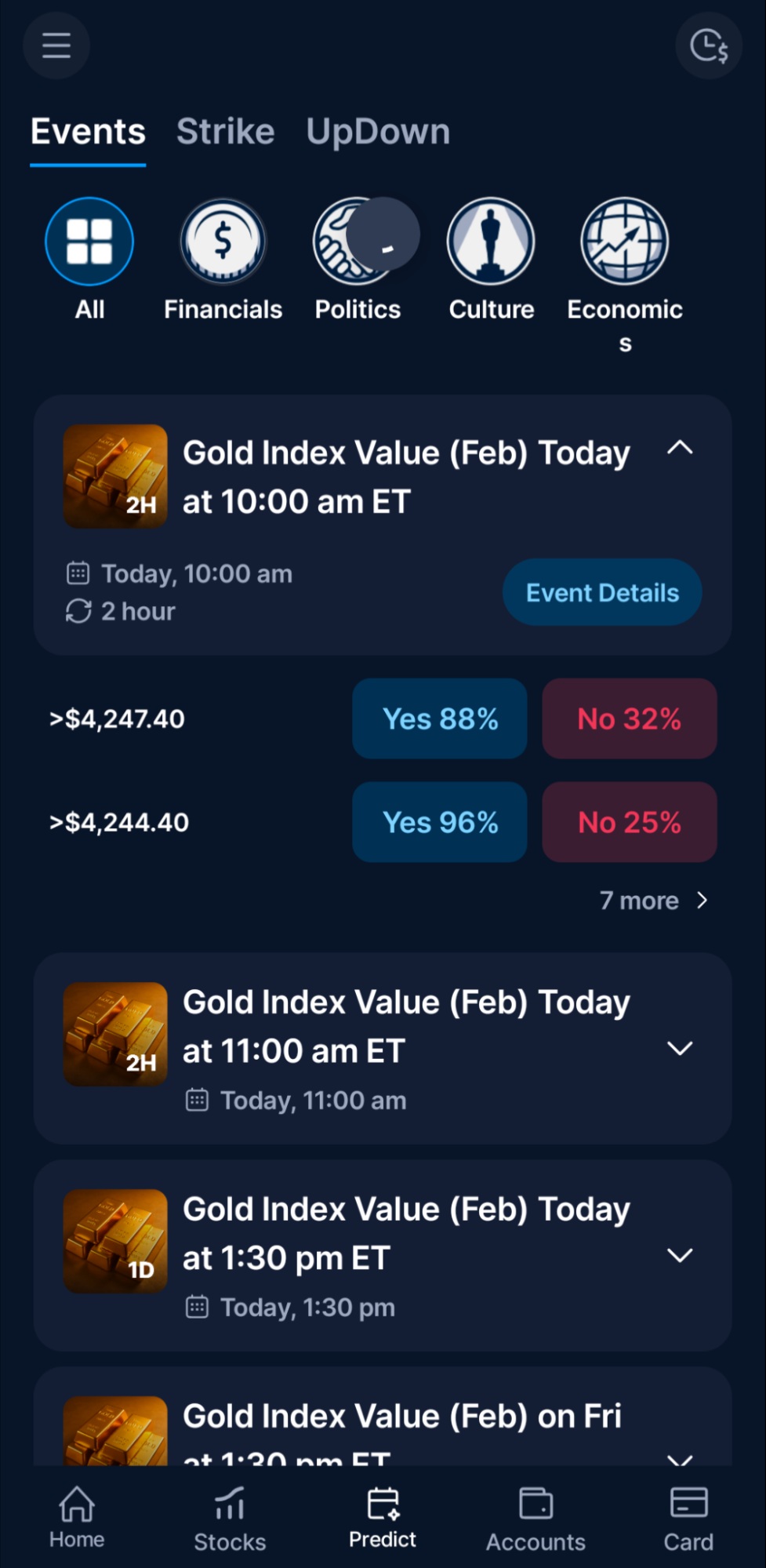
If you’ve used Crypto.com in the past, it’s undergone some changes to accommodate stocks and options. The new home screen is significantly less cluttered. Your primary navigation in the app centers on a bottom menu that features the most common activities.
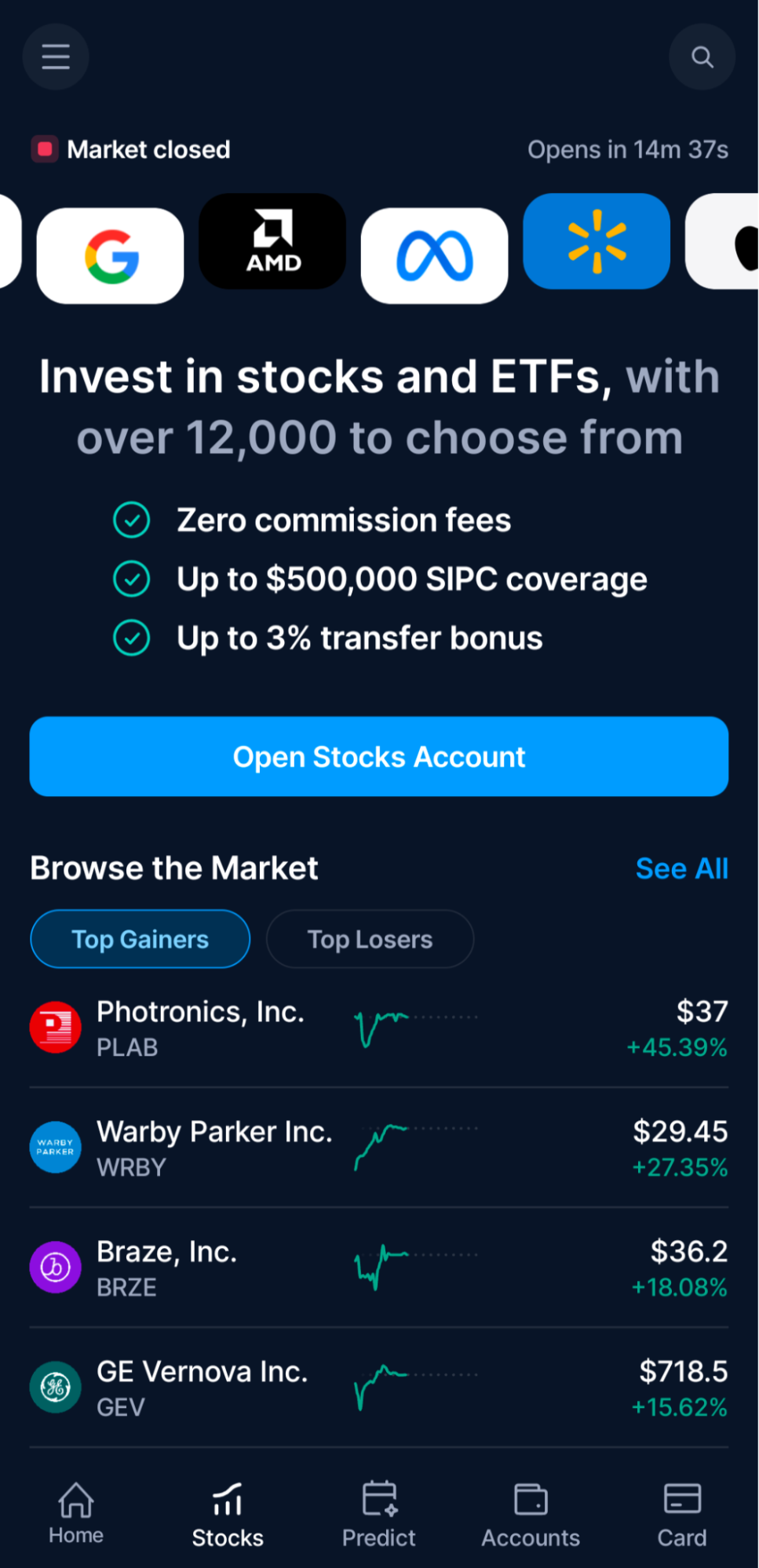
This updated design makes the app more user-friendly. Now, the Stocks tab provides U.S. users with direct access to equity trading, while the Predict tab features the CFTC-regulated binary options and prediction markets we discussed earlier in our Crypto.com App review. You can find account settings and preferences in the hamburger menu.
Ease of Use & Performance
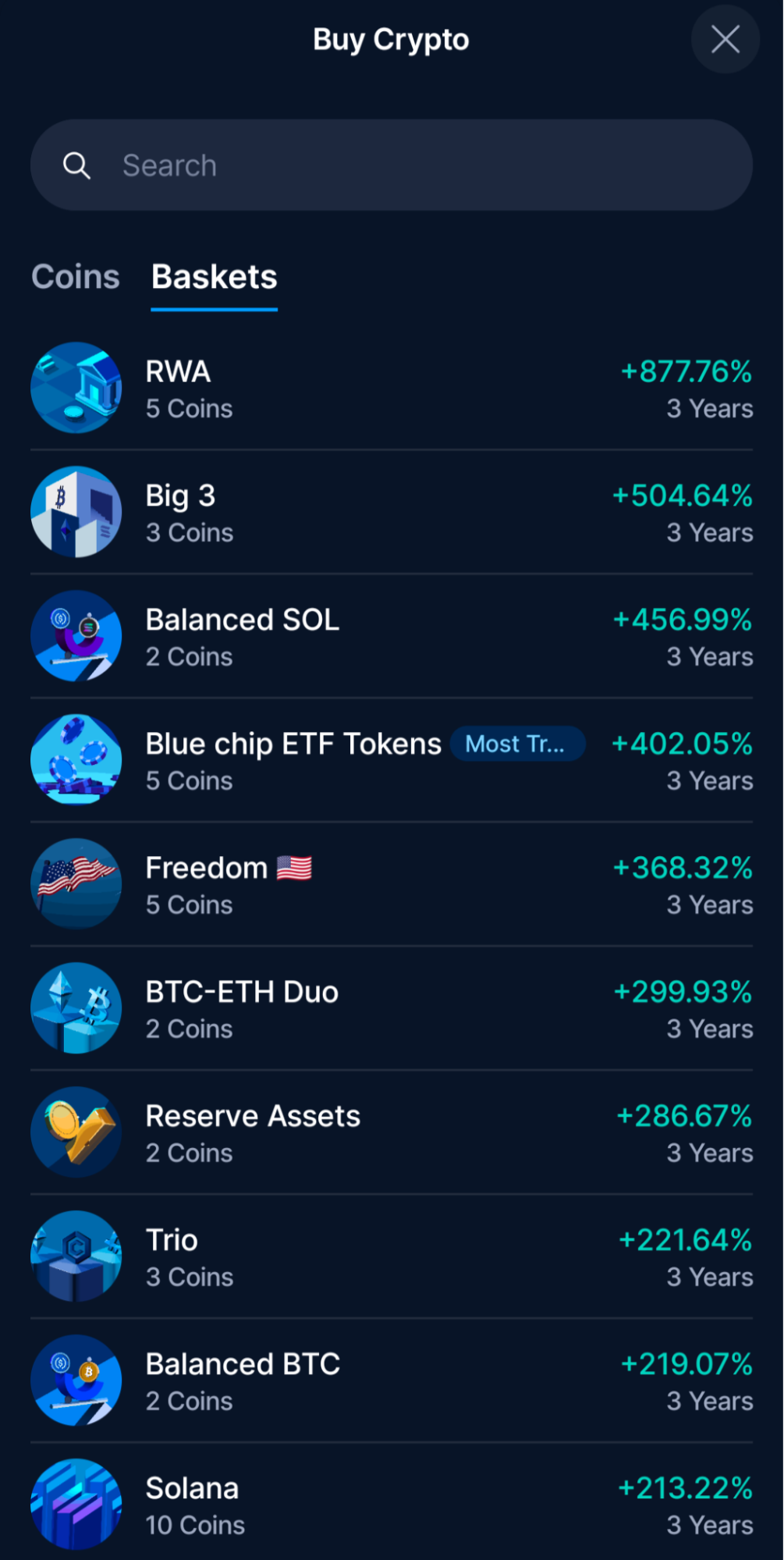
Functionally, this layout is far superior for beginners. Finding assets, buying, and selling all proved intuitive. You can also set limit orders for buy and sell orders by tapping the order options. Notably, limit orders on the Crypto.com App still use a spread, but it gives users more control over their trades. Other tools include recurring buys, price alerts, and baskets for both crypto and stocks (where available). Create your own basket or choose from curated assets.
How to Get Started with Crypto.com
Let’s review the basic steps to get started with Crypto.com.
Step 1: Download & Sign Up
Visit Crypto.com to get the official download link for the Crypto.com App (Android or iOS).
Enter a valid email address to begin.
Note: If you are an advanced trader looking for charts and order books, you’ll eventually want the separate Exchange App, but you must start here to create your primary account.
Step 2: Verify Your Identity (KYC)
Crypto.com complies with Know Your Customer (KYC) regulations, so you’ll need to provide some information beyond your email address.
- Your full legal name.
- A picture of your government-issued ID (Driver’s License or Passport).
- A “liveness” selfie (the app scans your face to ensure it matches the ID).
KYC verification is often completed in minutes, but can take up to 24 hours.
Step 3: Secure Your Account
Before depositing money, set up Multi-Factor Authentication (MFA). You’ll need a third-party app, such as Google Authenticator, to display time-limited codes. This step is required to add withdrawal addresses later, so it’s best to set it up now. Tap the Hamburger Menu (Top Left). Then, choose Security.
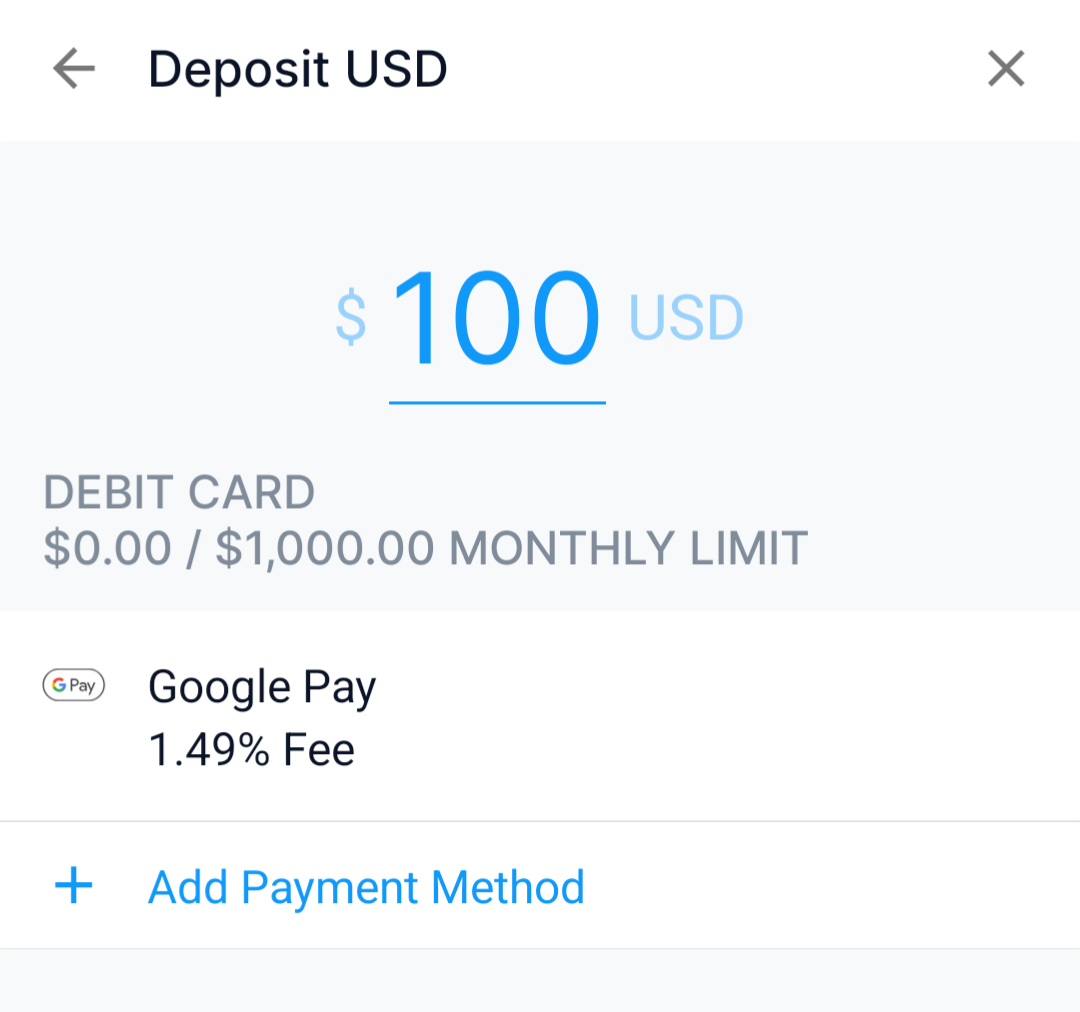
Step 4: Deposit Funds
To fund your account, tap the “Accounts” button on the Home tab. Then, select the account for your local currency. To deposit, you have two main options:
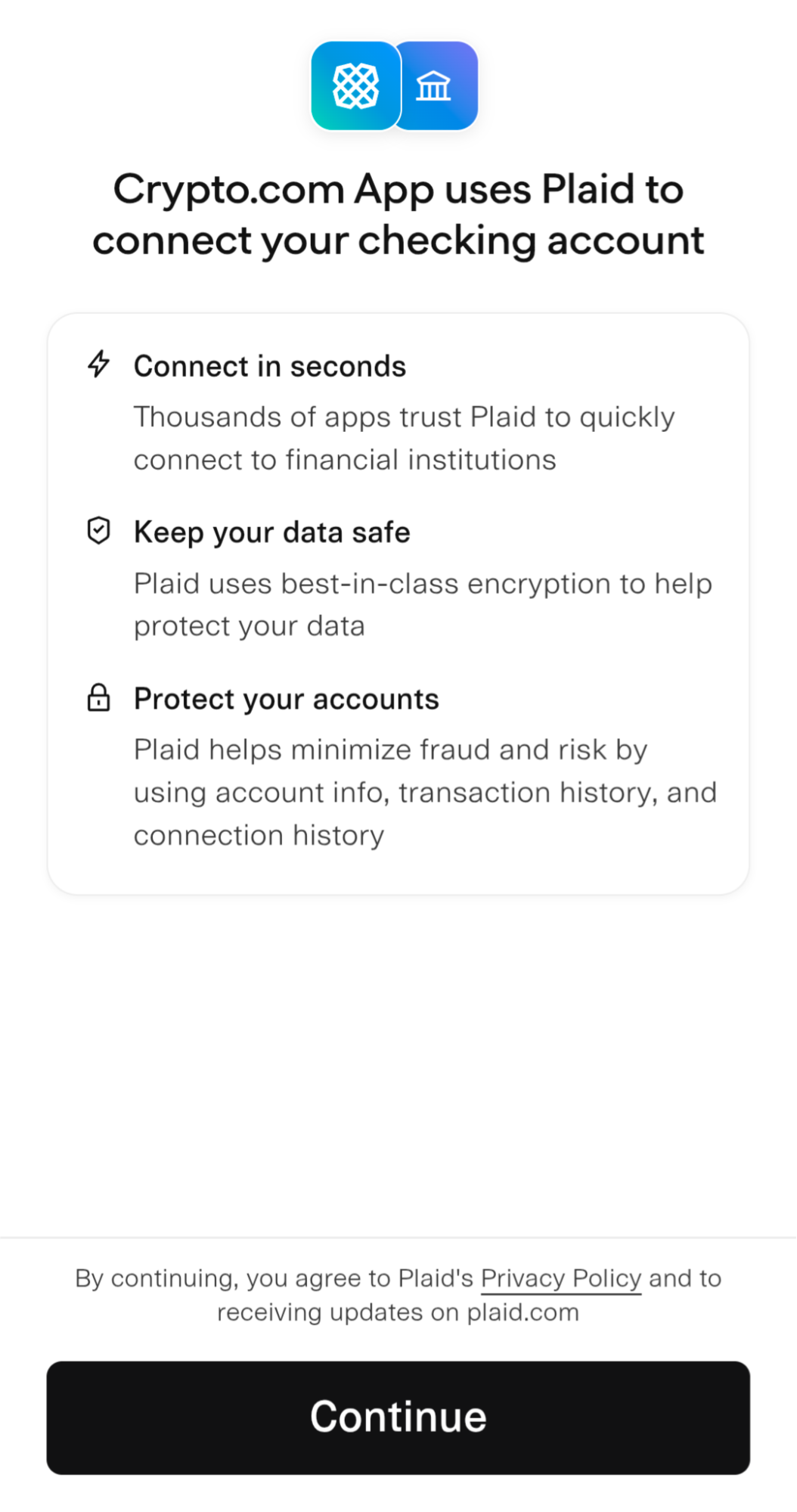
Bank Transfer: Provide your routing and account number, or link your bank account (faster). Crypto.com uses Plaid for this service in the U.S. Choose a deposit amount and complete the transfer. Standard bank transfers take 1-3 days but are free.
Debit Card: You can also link a debit card for deposits or instant buys, but U.S. users will pay a 1.49% fee (fees may vary by region).
Step 5: Place Your First Trade
Once your funds arrive, tap “Buy” on the Home dashboard. Select the asset you want to buy, such as Bitcoin. By default, your purchase will be a one-time market order. You can also set up recurring buys or create a limit order (you choose the price).
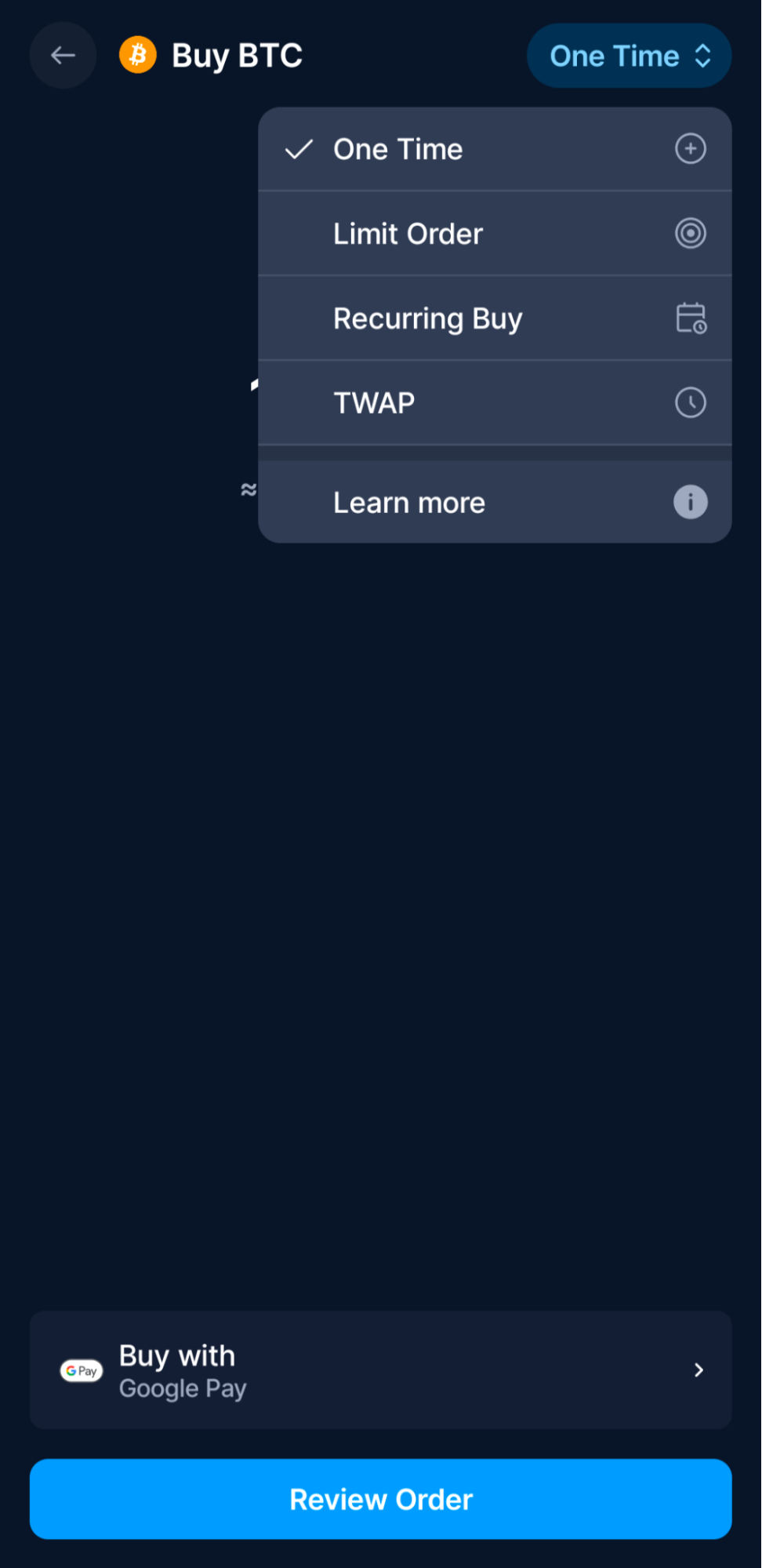
Next, enter the amount, and review/confirm the transaction if everything looks correct. Your crypto will appear in your Accounts tab instantly.
Customer Support
Most crypto exchanges still struggle with customer service perceptions. Crypto.com has a reputation that is best described as “mixed.” Reaching an actual person can prove challenging. Let’s take a look at the support options.
- Live Chat (In-App): This is the primary support channel. It uses a “bot firewall” to triage requests, which some users may find frustrating. Users navigate through several automated menus before the system connects to a real person.
- Ticket Times (Tiered Priority): Support speed is directly tied to your Level Up status. Private members receive “Priority Support,” allowing them to skip the queue and often connect to an agent in under 5 minutes. Standard users, unfortunately, may wait significantly longer.
- Phone Support: Crypto.com does not offer a direct phone line for account support, even for high-tier members. However, cardholders can reach out to a third-party administrator by phone for card-specific issues.
- Help Center: The self-help library is your best friend. You’ll find searchable help articles on the majority of “how-to” questions, so you rarely need to contact support for general inquiries.
Crypto.com reviews from users are mixed. On the good side, there is a 4.4 out of 5-star rating on the Google Play Store compared to 4.7 out of 5 stars on the App Store. However, Crypto.com user reviews take a dismal turn on Trustpilot, where users gave the platform a 1.3 out of 5-star rating. The general consensus is that support is helpful once you reach them, but many complaints center on the difficulty in reaching a live person.
The Verdict
How good is Crypto.com? A Crypto.com review in 2026 shows growth in both the scope of features and broader appeal compared to the Crypto.com of yesteryear. The platform’s updated offering delivers utility that pure-play exchanges can’t yet match. By integrating commission-free stock trading, CFTC-regulated prediction markets, and high-yield earn products into a single dashboard, it bridges the gap between a finance app and a crypto exchange.
Is Crypto.com worth using now? For most users, the answer is yes. If you are looking for a safe, regulated platform to manage your entire financial life (spending, investing, and trading), Crypto.com checks all the boxes. The “Level Up” program offers compelling perks, and the platform’s “Tier 1” regulatory status provides peace of mind.
However, this all-in-one convenience comes with a trade-off. The main Crypto.com App is designed to work seamlessly, but you often pay for that multi-asset support via spreads. To get the most out of Crypto.com, it’s essential to understand the differences between the App (for spending/investing) and the Exchange (for active trading). Experienced crypto traders will likely utilize both. Overall, we give the platform a final rating of 9.0 out of 10.
FAQs
Is Crypto.com safe and legit?
Is Crypto.com shutting down?
What are the downsides of Crypto.com?
Does Crypto.com pay out?
References
- Cronos | The Internet of Blockchains (cronos.org)
- Cronos Price | CRO Price, USD converter, Charts (crypto.com)
- Crypto.com Wins CFTC Approval (yahoo.com)
- Crypto.com Balances & Security (cer.live)
- Crypto.com Security Report & Next Steps (crypto.com)
- Collapse of FTX: A timeline of the crypto exchange’s failure (apnews.com)
- Proof of Reserves (crypto.com)
- Explained: The Crypto.com Hack (January 2022) (halborn.com)
- 24-Hour Withdrawal Lock on Newly Added Withdrawal Address (crypto.com)
- Crypto.com Help Center (crypto.com)
- Crypto.com Reviews (apple.com)
- Crypto.com Reviews (trustpilot.com)